

Read the lights and touch screen first, then reset the Holder. This order solves most faults when troubleshooting IQOS ILUMA i, and each step takes minutes. Use this IQOS ILUMA i troubleshooting UAE guide in Dubai, Ajman, Sharjah and Abu Dhabi. It covers signals, resets, charging, sticks, Pause Mode and support.
Why Does the Device Design Matter Before Troubleshooting IQOS ILUMA i?
The design matters because the Holder and the stick are separate parts that fail separately. The Holder heats the TEREA stick and carries a touch screen. The Pocket Charger recharges the Holder and holds a larger battery.
The device heats tobacco by induction from inside the stick with no blade. Wikipedia’s IQOS overview describes the same system for TEREA sticks. Our guide to induction heating in IQOS ILUMA and TEREA explains the technology in full.
Which Light and Screen Signals Matter Most in Troubleshooting IQOS ILUMA i?
Six touch screen signs cover the most common faults on the Holder, as listed in the table below:
| Screen sign | Meaning | Action |
|---|---|---|
| Two vertical lines alternating 3 times | Outside operating range | Move the device into 0–40°C |
| Letter “E” flashing 3 times | Magnet nearby, malfunction or failed firmware update | Reset the device |
| Number “0” flashing 3 times | Low battery | Charge the Holder in a charged Pocket Charger |
| Horizontal line with a circle below | Device Lock active | Turn off Device Lock in the IQOS app |
| Three horizontal lines in waves, 3 times | AutoStart disabled | Turn on AutoStart in the IQOS app |
| No lights | Holder off, discharged, dirty contacts or broken | Switch it on, charge it or clean it |
A blinking red light on the Holder or Pocket Charger signals a fault. The IQOS ILUMA i red light blinking fix is a reset, after moving the device away from magnets. A blinking yellow light means the battery is depleted.
How Do You Reset the Holder When Troubleshooting IQOS ILUMA i?
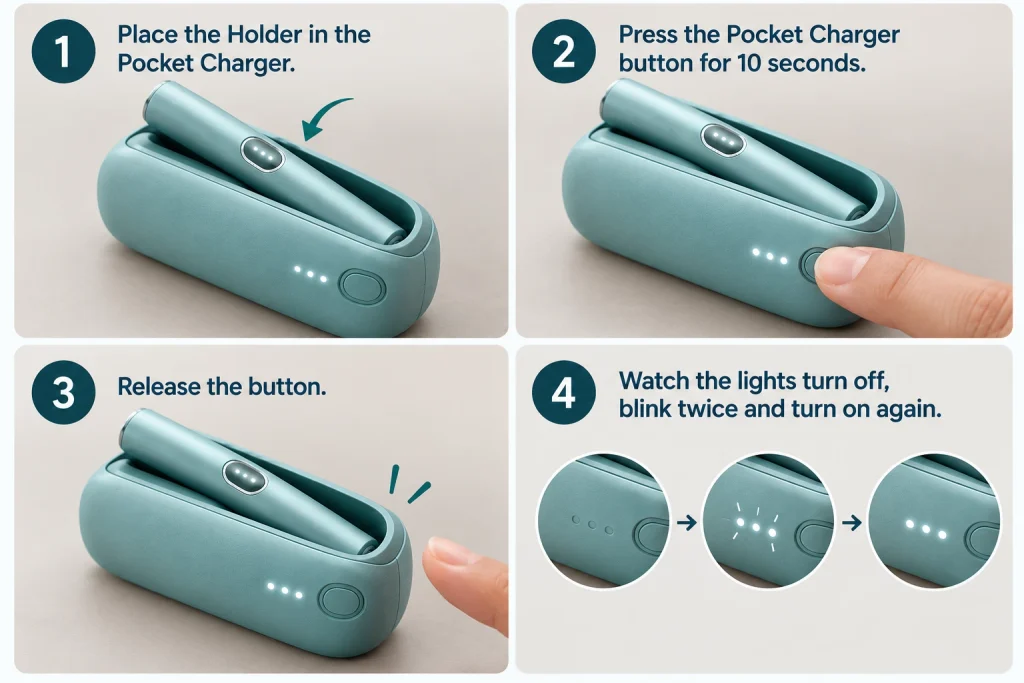
Press the Pocket Charger button for 10 seconds with the Holder inside. These IQOS ILUMA i reset instructions take four steps:
- Place the Holder in the Pocket Charger.
- Press the Pocket Charger button for 10 seconds.
- Release the button.
- Watch the lights turn off, blink twice and turn on again.
The blink pattern confirms the reset.
Where Does Charging Go Wrong When Troubleshooting IQOS ILUMA i?
The Pocket Charger and the charging ports are where charging goes wrong. The Pocket Charger requires at least one solid white light to fully charge the Holder. Leave the Holder inside until its two lights turn solid white.
For an IQOS ILUMA i not charging UAE case, check the contacts next. Clean the charging ports by blowing gently from a distance, and keep them dry. Use the official IQOS power adapter and cable, because incompatible accessories slow charging. A fully discharged Holder takes a few seconds to show lights.
Can the Wrong TEREA Stick Stop a Start When Troubleshooting IQOS ILUMA i?
Yes. A wrong stick or one not inserted to the line, stops the Holder from starting. For an IQOS ILUMA i holder not working UAE complaint, check these four points first:
- Use only TEREA SMARTCORE sticks, because other products shorten the session or block it.
- Insert the stick up to the line on the filter, with the coloured part facing outside.
- Keep the stick still during pre-heating, without pulling it out.
- Check the heating chamber for broken stick pieces, and never insert sharp objects.
A correct start brings a vibration, and a ring closes slowly on the screen. Try a fresh stick before blaming the Holder. Genuine TEREA sticks for ILUMA devices are designed for this Holder.
Why Do Pause Mode and FlexPuff Stop Working When Troubleshooting IQOS ILUMA i?
Pause Mode and FlexPuff stop working when a setting or a timing rule blocks them. A swipe down across the entire touch screen starts Pause Mode. A paused session ends after 8 minutes without a resume.
Pause Mode follows four rules:
- It works only in Performance Mode, so Eco Mode blocks it.
- It covers only one of the first two sessions from a fully charged Holder.
- It works only within the first 3 minutes or 8 puffs.
- It requires Pause turned on in the IQOS app.
FlexPuff adds extra puffs, shown by a ring that extends counter-clockwise. Active Pause Mode blocks FlexPuff, and large puffs make it unlikely. FlexPuff also requires activation in the IQOS app.
Does UAE Heat Affect Troubleshooting IQOS ILUMA i?
Yes. The ILUMA i operates only between 0°C and 40°C and heat in the UAE can pass that limit. Outside that range, a session stops or fails to start, and the battery drains faster. A device left in direct sun or a parked car in Dubai, Sharjah or Abu Dhabi can pass 40°C. Let it return to the operating range before use.
What Mistakes Cause Faults in Troubleshooting IQOS ILUMA i?
Three habits cause avoidable faults.
- Swiping down across the screen by accident, which pauses the session.
- Skipping the IQOS app, where Device Lock, AutoStart, Performance Mode and FlexPuff are set.
- Placing the Holder near magnets, which triggers the letter E or a red light.
When Does Troubleshooting IQOS ILUMA i Point to a Genuine Device Issue?
A fault points to the device when it survives a reset, a charge and clean contacts. Watch for these signs:
- A blinking red light that continues after a reset.
- The letter E returning after a reset.
- A blank screen after charging and cleaning the contacts, which signals a broken Holder.
- One or two horizontal lines blinking 8 times, which marks battery end of life.
Contact IQOS Customer Care or visit an IQOS store in the UAE for a replacement eligibility check.
Which Checklist Keeps the Device Performing After Troubleshooting IQOS ILUMA i?
Six checks that keep the ILUMA i ready for daily use are listed below:
- Charge the Holder in a Pocket Charger showing a solid white light.
- Use the official IQOS adapter and cable.
- Keep the charging ports clean and dry.
- Hold the device between 0°C and 40°C.
- Insert each TEREA stick up to the line.
- Review Device Lock, AutoStart and Pause settings in the IQOS app.
Where Can You Buy Genuine Devices After Troubleshooting IQOS ILUMA i in the UAE?
Genuine IQOS ILUMA i devices are available at vpdubai.ae. Browse the IQOS ILUMA i category or the IQOS ILUMA i PRIME range. TEREA and IQOS products arrive sealed in original packaging. Our TEREA flavours guide helps with stick choice.
What Else Do Readers Ask About Troubleshooting IQOS ILUMA i?
Can You Use HEETS Sticks When Troubleshooting IQOS ILUMA i?
No. The ILUMA i works only with TEREA SMARTCORE sticks. HEETS belong to older IQOS devices and can damage the Holder.
Does Troubleshooting IQOS ILUMA i Include Cleaning a Blade?
No. The ILUMA series has no blade, so no blade cleaning applies. Philip Morris states that this design removes the need to clean the device.
Is Manual Starting Possible When Troubleshooting IQOS ILUMA i?
Yes. Swipe a finger up from the bottom to the top of the touch screen. A new device has AutoStart on by default.
Is the Process the Same for Every ILUMA i Model When Troubleshooting IQOS ILUMA i?
No. The series has three models: PRIME, ILUMA i and ONE. The ONE uses a single button and an LED, while the others use the touch screen signs above.
Age notice: This content is for adults aged 18 and above. UAE law prohibits the sale of tobacco products, including vapes and heated tobacco to anyone under 18.